Next: Optimized Playback – X11 Up: Performance and other Tips Previous: Additional topics on hardware Contents Index
The current standard tool for switching between multiple gpus on most Linux distributions is switcherooctl. It acts as a userspace daemon to switch GPUs on the fly. This makes it so you can run specific applications (like CINELERRA-GG, games, or browsers) on the dedicated GPU using:
switcherooctl launch <command>
It integrates with desktop application menus by acting as a backend for GNOME and KDE to manage hybrid graphics (NVIDIA Optimus/AMD Switchable).
Once the switcheroo-control service is running, you can find options to launch applications on dedicated or integrated graphics by right-clicking application icons and select "Launch Using Dedicated Graphics Card". Its big advantage is that there is no need to log out in order to switch gpus. It supports both NVIDIA (proprietary, Optimus) and AMD/Intel hybrid, combo graphics.
Typical use case: Launch CINELERRA-GG or FFmpeg on the most powerful dedicated dGPU card, and let the rest of the desktop use the integrated iGPU.
1. Install and enable the service switcheroo-control service. For example on openSUSE Tumbleweed-Slowroll:
sudo zypper install switcheroo-control
sudo systemctl enable –now switcheroo-control.service
2. Verify available GPUs (for example on a legacy Intel Skylake workstation with iGPU and Nvidia dGPU card):
switcherooctl list Device: 0 Name: Intel HD Graphics 530 Default: yes Discrete: no Environment: DRI_PRIME=pci-0000_00_02_0 VK_LOADER_DRIVERS_SELECT=intel Device: 1 Name: NVIDIA Corporation GM206 [GeForce GTX 960] Default: no Discrete: yes Environment: __GLX_VENDOR_LIBRARY_NAME=nvidia __NV_PRIME_RENDER_OFFLOAD=1 __VK_LAYER_NV_optimus=NVIDIA_only VK_LOADER_DRIVERS_SELECT=nvidia |
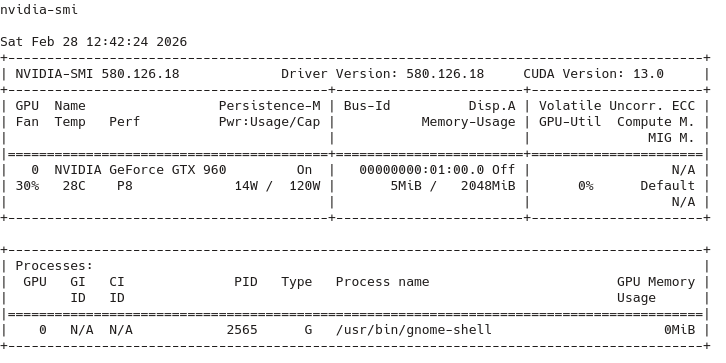
3. Verify if Nvidia's proprietary driver is installed and working by launching nvidia-smi:
4. Verify if Vulkan drivers are installed and working using vkcube demo (part of vulkan-tools):
4.1 On Intel iGPU (default):
switcherooctl launch -g 0 vkcube Selected WSI platform: wayland Selected GPU 0: Intel(R) HD Graphics 530 (SKL GT2), type: IntegratedGpu ^C |
4.2 On Nvidia dGPU:
switcherooctl launch -g 1 vkcube Selected WSI platform: wayland Selected GPU 0: NVIDIA GeForce GTX 960, type: DiscreteGpu ^C |
5. Launch CINELERRA-GG using Nvidia dGPU:
switcherooctl launch -g 1 cin Cinelerra Infinity - built: Jan 20 2026 06:03:54 file to render to /home/xxx/Videos/hdv09_04_cin_h264_nvenc.mp4 compression: h264_nvenc.mp4 yuv420p # encode for nvidia graphics hw only preset medium profile main Render::render_single: Session finished. ** rendered 5972 frames in 57.158 secs, 104.482 fps audio0 pad 64 0 (64) |